Features

MASS
Model of Architecture Serving Society redesign
We are proud that Agaric joined the Tech Co-Op Network as an early member. This network of North American tech worker co-ops seeks to encourage collaboration among its members and education of potential new co-op founders and the general public about worker cooperatives: businesses owned and controlled by the people who work in them.
Read all about it!
Sign up to be notified when Agaric gives a migration training:
In the previous article we explained the syntax used to write Drupal migrations. As part of the field mapping explanation, we talked about how to set subfields. This is a topic we have covered early in the 31 days of Drupal migrations series. On both occasions, we mentioned that finding out which subfields are available for a field type might require some Drupal development knowledge. To make the process easier, in today's article we are presenting a reference of subfields provided by core and contributed modules.
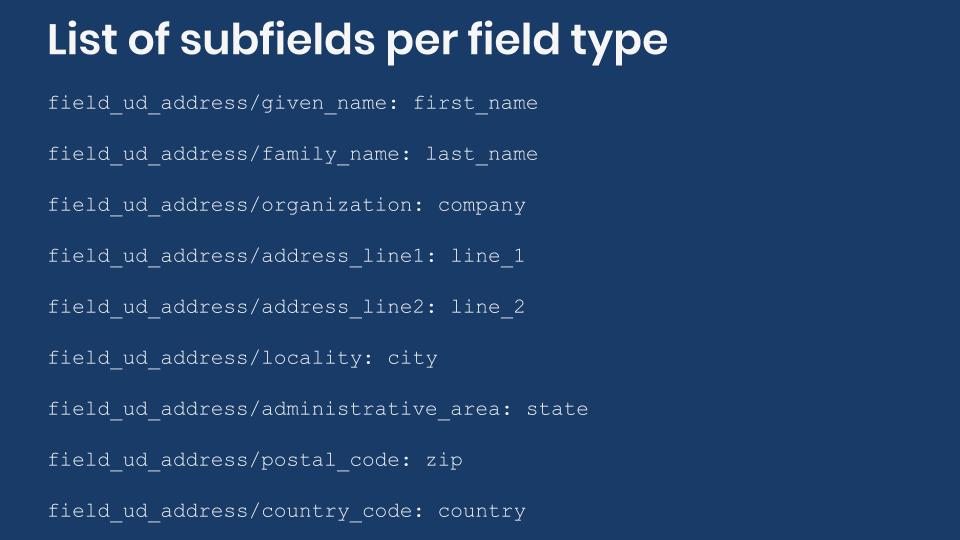
For each field type we will present: the module that provides it, its plugin ID and category, the class that defines it, the subfields available, and the default subfield if any. If a field has only one subfield, that will be its default. In some cases, there will be references to articles that cover migrating into those field types specifically.
As a refresher, if you want to find available subfields by yourself, you need to locate the class that provides the FieldType plugin and inspect its schema method. The latter defines the database columns used by the field to store its data. Because of object oriented practices, sometimes you need to look at the parent class to find all the subfields that are available. When migrating into subfields, you are actually migrating into those particular database columns. Any restriction set by the database schema needs to be respected.
Address field
Module: Address. Plugin ID: address. Category: Address.
Class: Drupal\address\Plugin\Field\FieldType\AddressItem
Related article: Migrating addresses into Drupal
Note: This field type does not have a default subfield.
List of subfields:
langcode: The language code.country_code: The two-letter country code as defined by the ISO 3166 standard.administrative_area: The top-level administrative subdivision of the country (e.g., state or province).locality: The locality (i.e. city).dependent_locality: The dependent locality (i.e. neighbourhood).postal_code: The postal or ZIP code. It will be validated againstadministrative_areaif validation patterns are available for that state or province.sorting_code: The sorting code.address_line1: The first line of the address block.address_line2: The second line of the address block.organization: The organization or company.given_name: The first name.additional_name: The middle name.family_name: The last name.
Country field
Module: Address. Plugin ID: address_country. Category: Address.
Class: Drupal\address\Plugin\Field\FieldType\CountryItem
Related article: Migrating addresses into Drupal
Subfield: value for the two-letter country code as defined by the ISO 3166 standard.
Zone field
Module: Address. Plugin ID: address_zone. Category: Address.
Class: Drupal\address\Plugin\Field\FieldType\ZoneItem
Related article: Migrating addresses into Drupal
Subfield: value for serialized version of a Zone object.
Boolean field
Module: Core library. Plugin ID: boolean. Category: General.
Class: Drupal\Core\Field\Plugin\Field\FieldType\BooleanItem
Subfield: value stores an integer number: 0 for FALSE and 1 for TRUE.
Number integer field
Module: Core library. Plugin ID: integer. Category: Number.
Class: Drupal\Core\Field\Plugin\Field\FieldType\IntegerItem
Subfield: value for the integer number.
Number float field
Module: Core library. Plugin ID: float. Category: Number.
Class: Drupal\Core\Field\Plugin\Field\FieldType\FloatItem
Subfield: value for the float number.
Number decimal field
Module: Core library. Plugin ID: decimal. Category: Number.
Class: Drupal\Core\Field\Plugin\Field\FieldType\DecimalItem
Subfield: value for the decimal number.
List integer field
Module: Options (Drupal core). Plugin ID: list_integer. Category: Number.
Class: Drupal\options\Plugin\Field\FieldType\ListIntegerItem
Subfield: value for the integer number. It is one of the keys in the “Allowed values list” of the field’s setting.
List float field
Module: Options (Drupal core). Plugin ID: list_float. Category: Number.
Class: Drupal\options\Plugin\Field\FieldType\ListFloatItem
Subfield: value for the float number. It is one of the keys in the “Allowed values list” of the field’s setting.
Text plain field
Module: Core library. Plugin ID: string. Category: Text.
Class: Drupal\Core\Field\Plugin\Field\FieldType\StringItem
Subfield: value for a short plain text. The maximum length is 255 characters unless a lower number is set in the field's storage settings.
Text plain, long field
Module: Core library. Plugin ID: string_long. Category: Text.
Class: Drupal\Core\Field\Plugin\Field\FieldType\StringLongItem
Subfield: value for a long plain text.
List text field
Module: Options (Drupal core). Plugin ID: list_string. Category: Text.
Class: Drupal\options\Plugin\Field\FieldType\ListStringItem
Subfield: value for the text. It is one of the keys in the “Allowed values list” of the field’s setting. The maximum length for a key is 255 characters.
Text formatted field
Module: Text (Drupal core). Plugin ID: text. Category: Text.
Class: Drupal\text\Plugin\Field\FieldType\TextItem
Default subfield: value
List of subfields:
value: A short text. It can include markup. The maximum length is 255 characters unless a lower number is set in the field's storage settings.format: A string containing the machine name of the text format to use. For example:plain_text,full_html,restricted_html, andbasic_html.
Text formatted, long field
Module: Text (Drupal core). Plugin ID: text_long. Category: Text.
Class: Drupal\text\Plugin\Field\FieldType\TextLongItem
Default subfield: value
List of subfields:
value: The text. It can include markup.format: A string containing the machine name of the text format to use. For example:plain_text,full_html,restricted_html, andbasic_html.
Text formatted, long with summary field
Module: Text (Drupal core). Plugin ID: text_with_summary. Category: Text.
Class: Drupal\text\Plugin\Field\FieldType\TextWithSummaryItem
Related article: Migrating formatted text
Default subfield: value
List of subfields:
value: The full text. It can include markup.summary: The summary text. It can include markup.format: A string containing the machine name of the text format to use. For example:plain_text,full_html,restricted_html, andbasic_html.
Comments field
Module: Comment (Drupal core). Plugin ID: comment. Category: General.
Class: Drupal\comment\Plugin\Field\FieldType\CommentItem
Subfield: status stores an integer number that indicates whether comments are allowed on the entity: 0 = no, 1 = closed (read only), 2 = open (read/write).
Datetime field
Module: Datetime (Drupal core). Plugin ID: datetime. Category: General.
Class: Drupal\datetime\Plugin\Field\FieldType\DateTimeItem
Related article: Migrating dates into Drupal
Subfield: value for the datetime value. It is a string similar to 2020-01-15T07:03:21.
If you decide to only store the date, the string will be similar to 2020-01-15.
Datetime range field
Module: Datetime Range (Drupal core). Plugin ID: daterange. Category: General.
Class: Drupal\datetime_range\Plugin\Field\FieldType\DateRangeItem
Related article: Migrating dates into Drupal
Default subfield: value
List of subfields:
valueThe start datetime value. It is a string similar to2020-01-15T07:03:21.end: The end datetime value. It is a string similar to2020-01-15T07:03:21.
If you decide to only store the date, the string for both subfields will be similar to 2020-01-15. If you decide to store all day, the value string will be similar to 2020-01-15T05:00:00 and the end string to 2020-01-17T04:59:59.
Email field
Module: Core library. Plugin ID: email. Category: General.
Class: Drupal\Core\Field\Plugin\Field\FieldType\EmailItem
Subfield: value for the email address.
Link field
Module: Link (Drupal core). Plugin ID: link. Category: General.
Class: Drupal\link\Plugin\Field\FieldType\LinkItem
Related article: Understanding the syntax of Drupal migrations
Default subfield: uri
List of subfields:
uri: A string for the link’s URI.title: A string for the link’s title.options: A serialized array of options for the link.
Telephone number field
Module: Telephone (Drupal core). Plugin ID: telephone. Category: Number.
Class: Drupal\telephone\Plugin\Field\FieldType\TelephoneItem
Subfield: value for the telephone number. It is a string of 256 characters maximum. For example: +1 (508) 283-3557 or 1800-DRUPAL.
Timestamp field
Module: Core library. Plugin ID: timestamp. Category: General.
Class: Drupal\Core\Field\Plugin\Field\FieldType\TimestampItem
Subfield: value for a UNIX timestamp value. It stores an integer in the range [-2147483648, 2147483648]. For example: 280299600. Note that the value can be negative.
Entity reference field including nodes, users, taxonomy terms, and media entities
Module: Core library. Plugin ID: entity_reference. Category: Reference.
Class: Drupal\Core\Field\Plugin\Field\FieldType\EntityReferenceItem
Subfield: target_id stores an integer representing the ID of the target entity: nid, uid, tid, mid, etc.
Entity reference file field
Module: File (Drupal core). Plugin ID: file. Category: Reference.
Class: Drupal\file\Plugin\Field\FieldType\FileItem
Related article: Migrating files and images into Drupal
Default subfield: target_id
List of subfields:
target_id: An integer representing the ID of the target entity.display: An flag to control whether this file should be displayed when viewing content. Possible values are 0 and 1.description: A description of the file.
Entity reference image field
Module: Image (Drupal core). Plugin ID: image. Category: Reference.
Class: Drupal\image\Plugin\Field\FieldType\ImageItem
Related articles: Migrating files and images into Drupal, Migrating images using the image_import plugin, and Migrating images using the image_import plugin
Default subfield: target_id
List of subfields:
target_id: An integer representing the ID of the target entity.alt: Alternative image text, for the image's 'alt' attribute.title: Image title text, for the image's 'title' attribute.width: The width of the image in pixels.height: The height of the image in pixels.
Entity reference revisions field including paragraphs
Module: Core library. Plugin ID: entity_reference_revisions. Category: Reference revisions.
Class: Drupal\Core\Field\Plugin\Field\FieldType\EntityReferenceItem
Related article: Introduction to paragraphs migrations in Drupal
Default subfield: target_id
List of subfields:
target_id: An integer representing the ID of the target entity:nid,uid,tid,fid, etc.target_revision_id: An integer representing the revision ID of the target entity.
Fields hidden from the user interface
Drupal core includes more field types that are hidden from the user interface. That is, it is not possible to add them from a content type’s “Manage fields” tab. For brevity, their subfields will not be listed. Instead, each will have a link to its definition class. There you can inspect the schema method to obtain the list of subfields. As of this writing, the hidden fields are:
changedprovided by Drupal\Core\Field\Plugin\Field\FieldType\ChangedItemcreatedprovided by Drupal\Core\Field\Plugin\Field\FieldType\CreatedItemfile_uriprovided by Drupal\file\Plugin\Field\FieldType\FileUriItemlanguageprovided by Drupal\Core\Field\Plugin\Field\FieldType\LanguageItemmapprovided by Drupal\Core\Field\Plugin\Field\FieldType\MapItempasswordprovided by Drupal\Core\Field\Plugin\Field\FieldType\PasswordItempathprovided by Drupal\path\Plugin\Field\FieldType\PathItemuriprovided by Drupal\Core\Field\Plugin\Field\FieldType\UriItemuuidprovided by Drupal\Core\Field\Plugin\Field\FieldType\UuidItem
Subfields for other contributed modules
There are hundreds of modules that provide new field types. It would be impractical to list all of them here. As mentioned before, you need to find a field type’s definition class to know which subfields are available. Contributed modules would have these classes in their /src/Plugin/Field/FieldType/ directory. The class itself will have the @FieldType annotation. For reference, below is a list of some contributed field types:
- Color Field module provides ColorFieldType.
- Geofield module provides GeofieldItem.
- Google Map Field module provides GoogleMapFieldType.
- Name Field module provides NameItem.
- Office Hours module provides OfficeHoursItem.
- Physical Fields module provides DimensionsItem and MeasurementItem.
- Viewfield module provides ViewfieldItem.
What did you learn in today’s article? Did you know that there were so many field types in Drupal core? Were you aware that some core field types are hidden from the user interface? Did you know how to find subfields for field types from contributed modules? Please share your answers in the comments. Also, we would be grateful if you shared this article with your friends and colleagues.
At noon on Wednesday July 22nd, 2015, Richard Stallman (RMS) and Noam Chomsky met for the first time. We met in Noam's office, located in the Stata building on the MIT campus in Cambridge, Massachusetts, where Richard also has an office. We sat down to discuss the Free Software Movement, Digital Restrictions Management, then we briefly touched on domain name seizures, workers rights and worker-cooperatives. The atmosphere was jovial yet serious, and the discussion was soon underway.

Noam asked, what is the Free Software Foundation and movement all about? Richard responded that The Free Software Foundation is a nonprofit with a worldwide mission to promote computer user freedom and to defend the rights of all free software users. We raise awareness about computing privacy issues and users rights, by exposing things like Digital Restrictions Management. The movement is our outreach to users seeking adoption of free software and informing the network on issues that support free software and working to change attitudes and support laws that make free software remain free.
RMS then took the time to explain Digital Restrictions Management and a little known practice called domain name seizure. The US government can arbitrarily take a domain away from the domain owner without court approval. There are many reasons a domain may be seized, If your domain ends with .com, no matter what country you are based in, you are subject to VeriSign helping the U.S. Government seize your domain.
On the topic of Digital Restrictions Management, Richard detailed how it prevents people from being good neighbors and sharing files. DRM is often written as "Digital Rights Management", but this is misleading, since it refers to systems that are designed to take away and limit your rights.
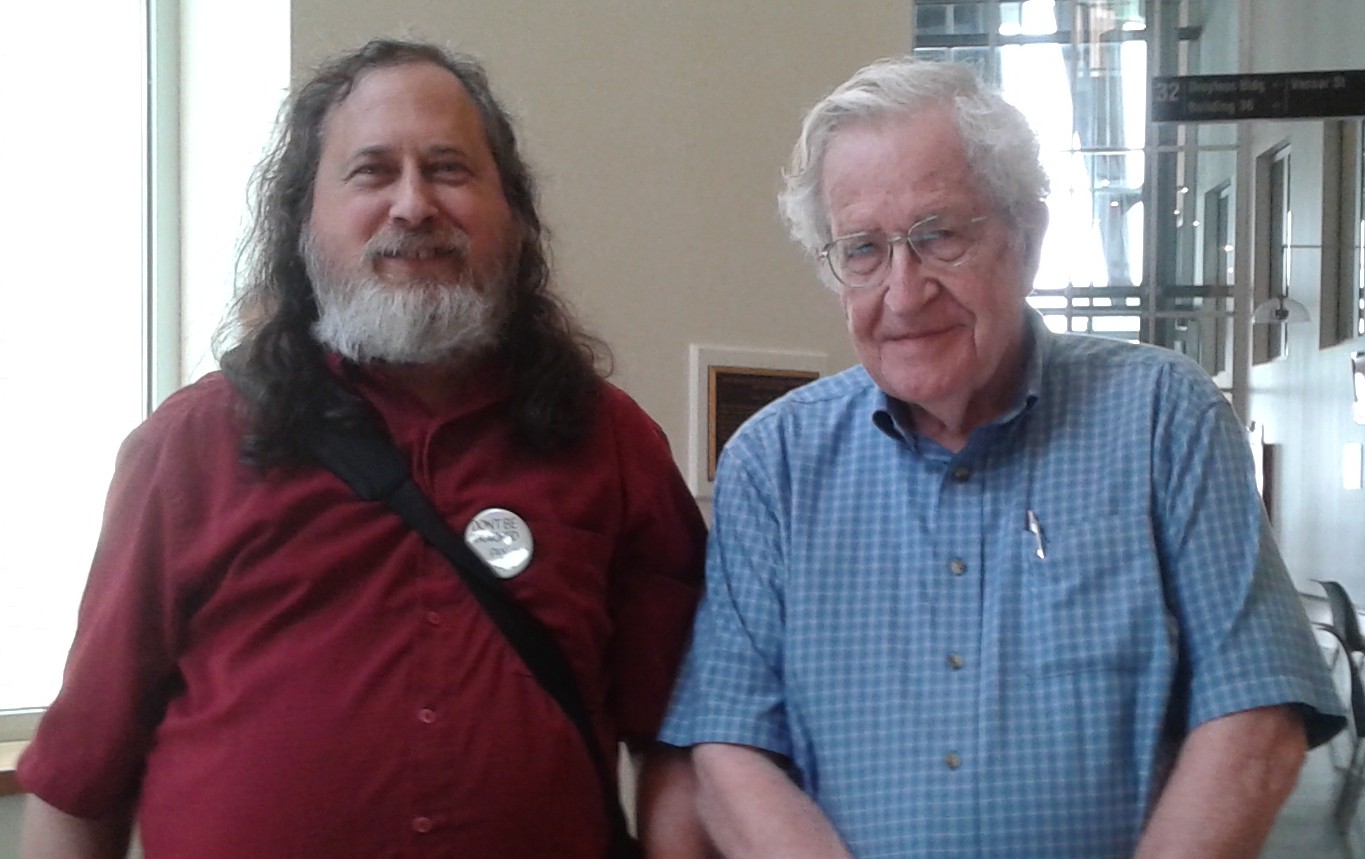
Below is a quote by each and a few links to sites with background information:
Richard Stallman
"Isn't it ironic that the proprietary software developers call us communists? We are the ones who have provided for a free market, where they allow only monopoly. … if the user chooses this proprietary software package, he then falls into this monopoly for support … the only way to escape from monopoly is to escape from proprietary software, and that is what the free software movement is all about. We want you to escape and our work is to help you escape. We hope you will escape to the free world."

Richard Stallman websites:
https://en.wikipedia.org/wiki/Richard_Stallman
http://fsf.org
https://gnu.org
https://stallman.org
Noam Chomsky
"How people themselves perceive what they are doing is not a question that interests me. I mean, there are very few people who are going to look into the mirror and say, 'That person I see is a savage monster'; instead, they make up some construction that justifies what they do. If you ask the CEO of some major corporation what he does he will say, in all honesty, that he is slaving 20 hours a day to provide his customers with the best goods or services he can and creating the best possible working conditions for his employees. But then you take a look at what the corporation does, the effect of its legal structure, the vast inequalities in pay and conditions, and you see the reality is something far different."

Noam Chomsky websites:
https://en.wikipedia.org/wiki/Noam_Chomsky
http://web.mit.edu/linguistics/people/faculty/chomsky
http://www.chomsky.info
At the end of our first meeting, Noam suggested that we take a look at congress and see who is voting against the TPP, and then contact those congress members with information about free software initiatives. We all realized that we barely had time to scratch the surface of the talking points we need to cover and agreed to meet again and discuss overlapping issues that are of concern to both the labor movement and the free software movement. We will be targeting issues that have solutions ready to be implemented, and making sure we are all aware of the dangers of proprietary software.
The next meeting will be sometime in the next few months... This is a beginning.
The Nonprofit Technology Conference (NTC) is one of the largest of its kind and is happening in Portland from March 13th-15th. On March 12th, the day before NTC a "Pre-Conference Day" is taking place to take a deeper dive into working with specific tools such as Drupal and Wordpress.
If you haven't already, you can register for NTC and the Pre-Conference Day at http://nten.org/ntc/registration/.
Ben and I will be presenting on migrating your website to Drupal 8. Here are the full details. Hope to see you there!
Migrating to Drupal 8 with Confidence
March 12th, 2:15-3:15pm
Drupal 8 is a powerful platform, with features many nonprofits are using to deepen their impact. However, migrations to any new platform can be hard. Fortunately, Drupal 8 comes with a suite of migration tools built-in, helping organizations migrate their website from previous versions of Drupal or any other source. As of Drupal 8, Drupal has also changed its development process so that features are continually added and upgrades to future versions will no longer require migration, so this may be the last migration you need to do!
We’ll walk through what is needed to effectively prepare for a migration, touching upon the specifics for WordPress and Drupal 7. Using real world examples, we’ll then look at what migrating users, blog posts and other content looks like. The session will wrap up with important “gotchas”, a list of further resources and time for Q&A. By the end you’ll have the tools and resources needed to migrate confidently.
In the previous two blog posts, we learned to migrate data from JSON and XML files. We presented to configure the migrations to fetch remote files. In today's blog post, we will learn how to add HTTP request headers and authentication to the request. . For HTTP authentication, you need to choose among three options: Basic, Digest, and OAuth2. To provide this functionality, the Migrate API leverages the Guzzle HTTP Client library. Usage requirements and limitations will be presented. Let's begin.
Migrate Plus architecture for remote data fetching
The Migrate Plus module provides an extensible architecture for importing remote files. It makes use of different plugin types to fetch file, add HTTP authentication to the request, and parse the response. The following is an overview of the different plugins and how they work together to allow code and configuration reuse.
Source plugin
The url source plugin is at the core of the implementation. Its purpose is to retrieve data from a list of URLs. Ingrained in the system is the goal to separate the file fetching from the file parsing. The url plugin will delegate both tasks to other plugin types provided by Migrate Plus.
Data fetcher plugins
For file fetching, you have two options. A general-purpose file fetcher for getting files from the local file system or via stream wrappers. This plugin has been explained in detail on the posts about JSON and XML migrations. Because it supports stream wrapper, this plugin is very useful to fetch files from different locations and over different protocols. But it has two major downsides. First, it does not allow setting custom HTTP headers nor authentication parameters. Second, this fetcher is completely ignored if used with the xml or soap data parser (see below).
The second fetcher plugin is http. Under the hood, it uses the Guzzle HTTP Client library. This plugin allows you to define a headers configuration. You can set it to a list of HTTP headers to send along with the request. It also allows you to use authentication plugins (see below). The downside is that you cannot use stream wrappers. Only protocols supported by curl can be used: http, https, ftp, ftps, sftp, etc.
Data parsers plugins
Data parsers are responsible for processing the files considering their type: JSON, XML, or SOAP. These plugins let you select a subtree within the file hierarchy that contains the elements to be imported. Each record might contain more data than what you need for the migration. So, you make a second selection to manually indicate which elements will be made available to the migration. Migrate plus provides four data parses, but only two use the data fetcher plugins. Here is a summary:
jsoncan use any of the data fetchers. Offers an extra configuration option calledinclude_raw_data. When set to true, in addition to all thefieldsmanually defined, a new one is attached to the source with the nameraw. This contains a copy of the full object currently being processed.simple_xmlcan use any data fetcher. It uses the SimpleXML class.xmldoes not use any of the data fetchers. It uses the XMLReader class to directly fetch the file. Therefore, it is not possible to set HTTP headers or authentication.soapdoes not use any data fetcher. It uses the SoapClient class to directly fetch the file. Therefore, it is not possible to set HTTP headers or authentication.
The difference between xml and simple_xml were presented in the previous article.
Authentication plugins
These plugins add authentication headers to the request. If correct, you could fetch data from protected resources. They work exclusively with the http data fetcher. Therefore, you can use them only with json and simple_xml data parsers. To do that, you set an authentication configuration whose value can be one of the following:
basicfor HTTP Basic authentication.digestfor HTTP Digest authentication.oauth2for OAuth2 authentication over HTTP.
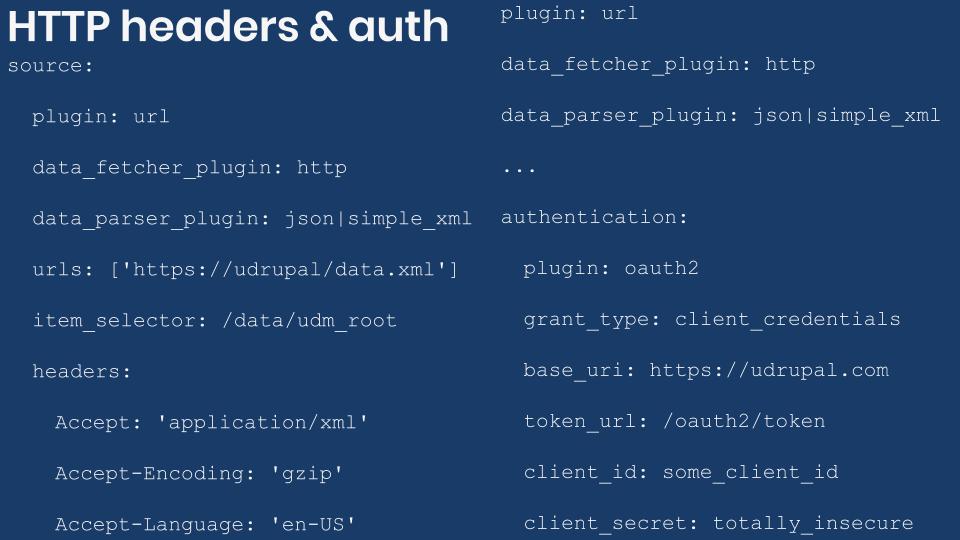
Below are examples for JSON and XML imports with HTTP headers and authentication configured. The code snippets do not contain real migrations. You can also find them in the ud_migrations_http_headers_authentication directory of the demo repository https://github.com/dinarcon/ud_migrations.
Important: The examples are shown for reference only. Do not store any sensitive data in plain text or commit it to the repository.
JSON and XML Drupal migrations with HTTP request headers and Basic authentication.
source: plugin: url data_fetcher_plugin: http # Choose one data parser. data_parser_plugin: json|simple_xml urls: - https://understanddrupal.com/files/data.json item_selector: /data/udm_root # This configuration is provided by theauthenticationhttpdata fetcher plugin. # Do not disclose any sensitive information in the headers. headers: Accept-Encoding: 'gzip, deflate, br' Accept-Language: 'en-US,en;q=0.5' Custom-Key: 'understand' Arbitrary-Header: 'drupal' # This configuration is provided by thebasicauthentication plugin. # Credentials should never be saved in plain text nor committed to the repo.: plugin: basic username: totally password: insecure fields: - name: src_unique_id label: 'Unique ID' selector: unique_id - name: src_title label: 'Title' selector: title ids: src_unique_id: type: integer process: title: src_title destination: plugin: 'entity:node' default_bundle: page
JSON and XML Drupal migrations with HTTP request headers and Digest authentication.
source: plugin: url data_fetcher_plugin: http # Choose one data parser. data_parser_plugin: json|simple_xml urls: - https://understanddrupal.com/files/data.json item_selector: /data/udm_root # This configuration is provided by theauthenticationhttpdata fetcher plugin. # Do not disclose any sensitive information in the headers. headers: Accept: 'application/json; charset=utf-8' Accept-Encoding: 'gzip, deflate, br' Accept-Language: 'en-US,en;q=0.5' Custom-Key: 'understand' Arbitrary-Header: 'drupal' # This configuration is provided by thedigestauthentication plugin. # Credentials should never be saved in plain text nor committed to the repo.: plugin: digest username: totally password: insecure fields: - name: src_unique_id label: 'Unique ID' selector: unique_id - name: src_title label: 'Title' selector: title ids: src_unique_id: type: integer process: title: src_title destination: plugin: 'entity:node' default_bundle: page
JSON and XML Drupal migrations with HTTP request headers and OAuth2 authentication.
source: plugin: url data_fetcher_plugin: http # Choose one data parser. data_parser_plugin: json|simple_xml urls: - https://understanddrupal.com/files/data.json item_selector: /data/udm_root # This configuration is provided by theauthenticationhttpdata fetcher plugin. # Do not disclose any sensitive information in the headers. headers: Accept: 'application/json; charset=utf-8' Accept-Encoding: 'gzip, deflate, br' Accept-Language: 'en-US,en;q=0.5' Custom-Key: 'understand' Arbitrary-Header: 'drupal' # This configuration is provided by theoauth2authentication plugin. # Credentials should never be saved in plain text nor committed to the repo.: plugin: oauth2 grant_type: client_credentials base_uri: https://understanddrupal.com token_url: /oauth2/token client_id: some_client_id client_secret: totally_insecure_secret fields: - name: src_unique_id label: 'Unique ID' selector: unique_id - name: src_title label: 'Title' selector: title ids: src_unique_id: type: integer process: title: src_title destination: plugin: 'entity:node' default_bundle: page
To use OAuth2 authentication, you need to install the `sainsburys/guzzle-oauth2-plugin` package as suggested in Migrate Plus’ `composer.json` file. You can do it via Composer issuing the following command: `composer require sainsburys/guzzle-oauth2-plugin`. Otherwise, you would get an error similar to the following:
[error]  Error: Class 'Sainsburys\Guzzle\Oauth2\GrantType\ClientCredentials'
not found in Drupal\migrate_plus\Plugin\migrate_plus\authentication\OAuth2->getAuthenticationOptions()
(line 46 of /var/www/drupalvm/drupal/web/modules/contrib/migrate_plus/src/Plugin/migrate_plus/authentication/OAuth2.php)
#0 /var/www/drupalvm/drupal/web/modules/contrib/migrate_plus/src/Plugin/migrate_plus/data_fetcher/Http.php(100):
Drupal\migrate_plus\Plugin\migrate_plus\authentication\OAuth2->getAuthenticationOptions()
What did you learn in today’s blog post? Did you know the configuration names for adding HTTP request headers and authentication to your JSON and XML requests? Did you know that this was limited to the parsers that make use of the http fetcher? Please share your answers in the comments. Also, I would be grateful if you shared this blog post with others.
Next: Migrating Google Sheets into Drupal
This blog post series, cross-posted at UnderstandDrupal.com as well as here on Agaric.coop, is made possible thanks to these generous sponsors: Drupalize.me by Osio Labs has online tutorials about migrations, among other topics, and Agaric provides migration trainings, among other services. Contact Understand Drupal if your organization would like to support this documentation project, whether it is the migration series or other topics.
We've been honored to help some key curators of content get the word out.
GEO
GEO.coop, Grassroots Economic Organizing, is a decentralized collective of educators, researchers and grassroots activists working to promote a solidarity economy based on democratic participation, worker and community ownership, social and economic justice, and ecological sustainability. Their raising up of and participation in grassroots journalism, organizing support, cross-sector networking and movement-building, and educational and organizational resources helps catalyze worker co-ops & the solidarity economy.
Portside
Portside.org is a digital media outlet that publishes and curates articles and videos of interest to the left. This curation lifts up critical voices in an age of media saturation and facilitates thoughtful, bold dialog online. Read more about our work with Portside.
CRLA Homepage
Based on our assessment of CRLA's most important audience and goals—working class, immigrant, and bilingual potential clients need to be able to find questions or get in contact—we identified the following as important elements of their homepage:
- a visible call to action to use their provided phone number to get in touch with someone
- prominent statements and links to resources regarding COVID-19
- a list of news teasers to highlight their great work
- an indication of what sorts of questions they are able to answer
Learn to move content to Drupal 8 using the Migrate module without writing a single line of PHP. This training is aimed at site builders who will learn to combine various core and contributed modules and write YAML files to accomplish content migrations. No prior experience with the Migrate module is required.
Source, process, and destination plugins will be explained to learn how each affect the migration. By the end of the session, you will have a better understanding on how the Migrate module works and the thought process required to plan and perform migrations.
Note: Although no prior Migrate module knowledge is required, it is expected that you have a basic understanding of nodes, content types, and fields. You can learn about these and other Drupal concepts by watching this session recording https://www.youtube.com/watch?v=02fvLzPSIjc
Learning objectives
- Import data from CSV and JSON files.
- Transform the data to populate taxonomy, date, image, file, and address fields.
- Get content into Paragraphs.
- Learn to debug migrations.
Pre-requisites
A working Drupal 8 local installation is required. Attendees need to feel comfortable working with the command line. They also need composer and be able to install Drupal modules. Drush needs to be installed in order to run migrations from the command line. Xdebug and PHPStorm are used for the debugging example (techniques apply for other debuggers and IDEs). It is highly recommended to use DrupalVM and configure it to use the Drupal composer template.
Setup instructions
Follow the quickstart guide to install DrupalVM with the xdebug extra package. Install the following contrib modules: Address, Entity reference revisions, Migrate plus, Migrate source csv, Migrate tools, and Paragraphs. Assistance can be provided before the training starts, but it is better to come with your local environment already set up.
See the Agaric's migration training resources for more.

After years of giving a terrible initial experience to people who want to share their first project on Drupal.org, the Project Applications Process Revamp is a Drupal Association key priority for the first part of 2017.
A plan for incentivizing code review of every project, not just new ones, after the project applications revamp is open for suggestions and feedback.
Which makes it excellent timing that right now you can get credit on your Drupal.org profile and that of your organization, boosting marketplace ranking, for reviewing the year-old backlog of project applications requesting review. The focus is on security review for these project applications, but if you want to give a thorough review and then give your thoughts on how project reviews (for any project that opts in to this quality marker) should be performed and rewarded going forward, now's the time and here's the pressing need.

To the extent possible under law, Clayton Dewey has waived all copyright and related or neighboring rights to Build and Manage Online Donations in Drupal with the Give Module. This work is published from: United States.
In other words, please reuse and remix this article as you see fit! No attribution is required, it just needs to continue to stay in the Public Domain.
In the last blog post we were introduced to managing migration as configuration entities using Migrate Plus. Today, we will present some benefits and potential drawbacks of this approach. We will also show a recommended workflow for working with migration as configuration. Let’s get started.
What is the benefit of managing migration as configurations?
At first sight, there does not seem to be a big difference between defining migrations as code or configuration. You can certainly do a lot without using Migrate Plus’ configuration entities. The series so far contains many examples of managing migrations as code. So, what are the benefits of adopting s configuration entities?
The configuration management system is one of the major features that was introduced in Drupal 8. It provides the ability to export all your site’s configuration to files. These files can be added to version control and deployed to different environments. The system has evolved a lot in the last few years, and many workflows and best practices have been established to manage configuration. On top of Drupal core’s incremental improvements, a big ecosystem has sprung in terms of contributed modules. When you manage migrations via configuration, you can leverage those tools and workflows.
Here are a few use cases of what is possible:
- When migrations are managed in code, you need file system access to make any changes. Using configuration entities allows site administrators to customize or change the migration via the user interface. This is not about rewriting all the migrations. That should happen during development and never on production environments. But it is possible to tweak certain options. For example, administrators could change the location to the file that is going to be migrated, be it a local file or on a remote server.
- When writing migrations, it is very likely that you will work on a subset of the data that will eventually be used to get content into the production environment. Having migrations as configuration allow you to override part of the migration definition per environment. You could use the Configuration Split module to configure different source files or paths per environment. For example, you could link to a small sample of the data in development, a larger sample in staging, and the complete dataset in production.
- It would be possible to provide extra configuration options via the user interface. In the article about adding HTTP authentication to fetch remote JSON and XML files, the credentials were hardcoded in the migration definition file. That is less than ideal and exposes sensitive information. An alternative would be to provide a configuration form in the administration interface for the credentials to be added. Then, the submitted values could be injected into the configuration for the migration. Again, you could make use of contrib modules like Configuration Split to make sure those credentials are never exported with the rest of your site’s configuration.
- You could provide a user interface to upload migration source files. In fact, the Migrate source UI module does exactly this. It exposes an administration interface where you have a file field to upload a CSV file. In the same interface, you get a list of supported migrations in the system. This allows a site administrator to manually upload a file to run the migration against. Note: The module is supposed to work with JSON and XML migrations. It did not work during my tests. I opened this issue to follow up on this.
These are some examples, but many more possibilities are available. The point is that you have the whole configuration management ecosystem at your disposal. Do you have another example? Please share it in the comments.
Are there any drawbacks?
Managing configuration as configuration adds an extra layer of abstraction in the migration process. This adds a bit of complexity. For example:
- Now you have to keep the
uuidandidkeys in sync. This might not seem like a big issue, but it is something to pay attention to. - When you work with migrations groups (explained in the next article), your migration definition could live in more file.
- The configuration management system has its own restrictions and workflows that you need to follow, particularly for updates.
- You need to be extra careful with your YAML syntax, especially if syncing configuration via the user interface. It is possible to import invalid configuration without getting an error. It is until the migration fails that you realize something is wrong.
Using configuration entities to define migrations certainly offers lots of benefits. But it requires being extra careful managing them.
Workflow for managing migrations as configuration entities
The configuration synchronization system has specific workflows to make changes to configuration entities. This imposes some restrictions in the way you make updates to the migration definitions. Explaining how to manage configuration could use another 31 days blog post series. ;-) For now, only a general overview will be presented. The general approach is similar to managing configuration as code. The main difference is what needs to be done for changes to the migration files to take effect.
You could use the “Configuration synchronization” administration interface at /admin/config/development/configuration. In it you have the option to export or import a “full archive” containing all your site’s settings or a “single item” like a specific migration. This is one way to manage migrations as configuration entities which lets you find their UUIDs if not set initially. This approach can be followed by site administrators without requiring file system access. Nevertheless, it is less than ideal and error-prone. This is not the recommended way to manage migration configuration entities.
Another option is to use Drush or Drupal Console to synchronize your site’s configuration via the command line. Similarly to the user interface approach, you can export and import your full site configuration or only single elements. The recommendation is to do partial configuration imports so that only the migrations you are actively working on are updated.
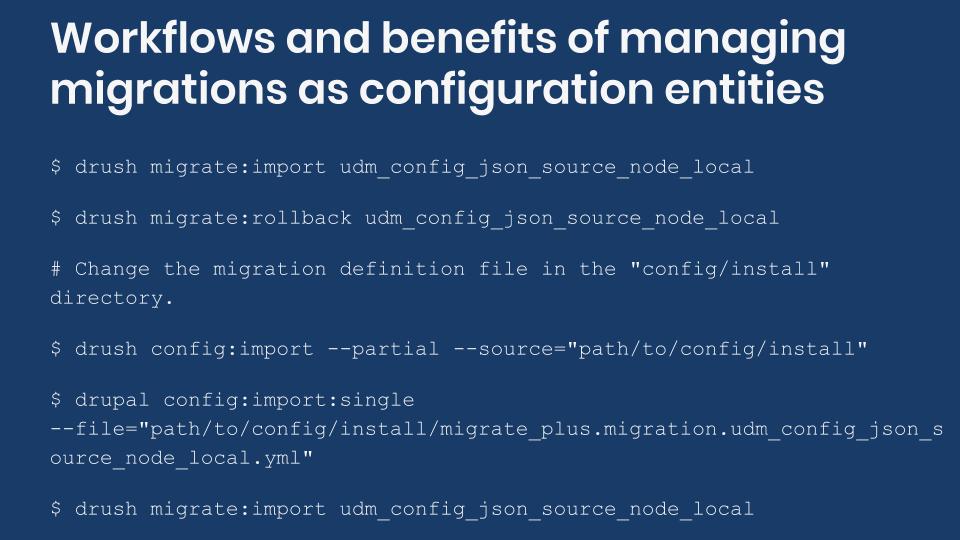
Ideally, your site’s architecture is completed before the migration starts. In practice, you often work on the migration while other parts of the sites are being built. If you were to export and import the entire site’s configuration as you work on the migrations, you might inadvertently override unrelated pieces of configurations. For instance, this can lead to missing content types, changed field settings, and lots of frustration. That is why doing partial or single configuration imports is recommended. The following code snippet shows a basic Drupal workflow for managing migrations as configuration:
# 1) Run the migration.
$ drush migrate:import udm_config_json_source_node_local

# 2) Rollback migration because the expected results were not obtained.
$ drush migrate:rollback udm_config_json_source_node_local

# 3) Change the migration definition file in the "config/install" directory.

# 4a) Sync configuration by folder using Drush.
$ drush config:import --partial --source="modules/custom/ud_migrations/ud_migrations_config_json_source/config/install"

# 4b) Sync configuration by file using Drupal Console.
$ drupal config:import:single --file="modules/custom/ud_migrations/ud_migrations_config_json_source/config/install/migrate_plus.migration.udm_config_json_source_node_local.yml"

# 5) Run the migration again.
$ drush migrate:import udm_config_json_source_node_local
Note the use of the --partial and --source flags in the migration import command. Also, note that the path is relative to the current working directory from where the command is being issued. In this snippet, the value of the source flag is the directory holding your migrations. Be mindful if there are other non-migration related configurations in the same folder. If you need to be more granular, Drupal Console offers a command to import individual configuration files as shown in the previous snippet.
Note: Uninstalling and installing the module again will also apply any changes to your configuration. This might produce errors if the migration configuration entities are not removed automatically when the module is uninstalled. Read this article for details on how to do that.
What did you learn in today’s blog post? Did you know the know the benefits and trade-offs of managing migrations as configuration? Did you know what to do for changes in migration configuration entities to take effect? Share your answers in the comments. Also, I would be grateful if you share this blog post with others.
Next: Using migration groups to share configuration among Drupal migrations
This blog post series, cross-posted at UnderstandDrupal.com as well as here on Agaric.coop, is made possible thanks to these generous sponsors. Contact Understand Drupal if your organization would like to support this documentation project, whether it is the migration series or other topics.
Overview
You will learn to use the Migrate API to upgrade your Drupal 6/7 site to Drupal 11. Check how the automated upgrade procedure can help you get a head start in writing the migrations. You will learn different migration strategies, how to accommodate changes in site architecture, tips on troubleshooting issues, and much more.
With the maturity of Drupal 11, now is a great time to upgrade your site from Drupal 6 or 7.
There will be plenty of hands on examples to demonstrate different migration strategies even for projects that do not offer automatic upgrade paths. Time will also be allocated to answer attendee’s project specific questions for topics not covered in the predefined material.